Tampilkan postingan dengan label downloads. Tampilkan semua postingan

Download Realtek HD Audio 2.82 Windows 32 bit & 64 bit

The Realtek High Definition Audio codecs are compliant with Microsoft’s UAA (Universal Audio Architecture). The top series provide 10 DAC channels that simultaneously support 7.1 sound playback, plus 2 channels of independent stereo sound output (multiple streaming) through the front panel stereo output. Flexible mixing, mute, and fine gain control…


functions provide a complete integrated audio solution for home entertainment PCs.
  • Meets Microsoft WLP 3.10 and future WLP audio requirements
  • WaveRT based audio function driver for Windows Vista
  • Direct Sound 3D compatible
  • Multi bands of software equalizer and tool are provided
  • Microphone Acoustic Echo Cancellation (AEC), Noise Suppression (NS), and Beam Forming (BF) technology for voice application

Realtek HD Audio Driver including Realtek HD Audio Drivers: ALC882, ALC883, ALC885, ALC886, ALC887, ALC888, ALC889, ALC892, ALC899, ALC861VD, ALC660, ALC662, ALC663, ALC665, ALC670, ALC671, ALC672, ALC676, ALC680, ALC221, ALC231, ALC260, ALC262, ALC267, ALC268, ALC269, ALC270, ALC272, ALC273, ALC275, ALC276, ALC280, ALC282, ALC283, ALC290


DISABLE YOUR ADBLOCK PLUS, REFRESH THIS PAGE
after click the link below, wait 5 seconds, then click on "SKIP AD" in the upper right corner 
(setelah di klik link dibawah. Tunggu 5 detik, lalu klik tulisan "SKIP AD" di pojok kanan atas)


Download Opera 47 FINAL OFFLINE INSTALLER for MacOS, Linux Windows

Opera 47 enters into the stable build today after undergoing a short development cycle (shorter than our usual 6-week period). Albeit light on major features, this version of Opera comes with a handful of useful improvements. Two of these improvements help assist in convenience: the ability to export all bookmarks and increased capacity for the recently closed tab. Your personal newsfeed received two additional refresh intervals and the user interface gained refined visuals for better readability.
Opera 47

Exportable bookmarks

This stable build provides a choice of exporting all of your bookmarks. Everything from your Speed Dial, bookmarks bar and other folders are neatly listed in a single HTML file. Additionally, the bookmarks pop up – seen when adding a new bookmark or Speed Dial entry – received some fixes to bugs experienced earlier.

Smoother background loading of news

Today’s news cycle comes fast and frequent, and the bombardment of information can be overwhelming not only for yourself but also your browser. To reduce interruptions and save some data usage from the browser, your personal news can now be refreshed at two new intervals of three or six hours.

Longer list of closed tabs

Many of our users had requested an expansion of the capacity for the recently closed tab in the tabs bar. Opera now retains up to 32 closed tabs, up from the original 10, for you to recall at the moment’s notice. This becomes a handy shortcut to your history log. (Tip: You can reopen the most recently closed tab by right-clicking any tab and selecting Reopen Last Closed Tab).

Smoother video playback

Additionally, we have cleaned up some issues relating to videos across different systems. Windows 7 Aero users should no longer see flickering background images when switching between YouTube videos. For macOS adherents, broken auto-played YouTube videos when going to fullscreen were fixed. Everyone should see a smoother video pop-up player in Opera 47.

Quality improvements to the design

We sharpened up the colors and appearances of the interface. To better complement our dark theme, dark favicons (the icons associated with a website) received a touch of lighter color to make them more visible in your bookmarks bar. If you decide to stick with the light theme of Opera, we have cleaned up color contrasting for better readability.

Security and engine update

Opera features a “risky file protection” in order to prevent the most scary file types from being downloaded. Opera 47 has been beefed up with .scf files added to the risky file extensions list (for Windows). Our fine-tuned version of Chromium was updated to version 60.


Download FIREFOX 55 OFFLINE INSTALLER 2017 WINDOWS 32 BIT + 64 BIT, LINUX, macOS

Mozilla Firefox 55 is the most popular browser in the World, used by millions of people. It offers great security, privacy, and protection against viruses, spyware, malware, and it can also easily block pop-up windows. The latest version is highly customizable, supports add-ons and extensions, and each browser profile can be configured with different settings.


User Experience
  • The enhancements to Firefox provide the best possible browsing experience on the Web. The new Firefox smart location bar, affectionately known as the "Awesome Bar," learns as people use it, adapting to user preferences and offering better fitting matches over time.
Performance
  • Firefox is built on top of the powerful new Gecko platform, resulting in a safer, easier to use and more personal product.
Security
  • Firefox raises the bar for security. The new malware and phishing protection helps protect from viruses, worms, trojans and spyware to keep people safe on the Web.
Customization
  • Everyone uses the Web differently, and Firefox lets users customize their browser with more than 5,000 add-ons.


Firefox 55 Final Minimum System Requirements

Windows

Operating Systems
  • Windows 7 SP1
  • Windows 8
  • Windows 8.1
  • Windows 10
Please note that while the 32-bit and 64-bit versions of Windows Vista and Windows 7 can be used to run Firefox 25, only  32-bit builds of Firefox 25 are supported at this time.
Recommended Hardware
  • Pentium 4 or newer processor that supports SSE2
  • 2 GB recommended
  • 200MB of hard drive space

Mac

Operating Systems
  • Mac OS X 10.9
  • Mac OS X 10.10
  • Mac OSX 10.11
  • Mac OSX 10.12
Recommended Hardware
  • Macintosh computer with an Intel x86 processor
  • 2 GB RAM (or Higher)
  • 200 MB hard drive space

Linux

Software Requirements
Please note that Linux distributors may provide packages for your distribution which have different requirements.
  • Firefox will not run at all without the following libraries or packages:
    • GTK+ 2.18 or higher
    • GLib 2.22 or higher
    • Pango 1.14 or higher
    • X.Org 1.0 or higher (1.7 or higher is recommended)
    • libstdc++ 4.3 or higher
  • For optimal functionality, we recommend the following libraries or packages:
    • NetworkManager 0.7 or higher
    • DBus 1.0 or higher
    • HAL 0.5.8 or higher
    • GNOME 2.16 or higher


What's New in Firefox 55 Final Version ?


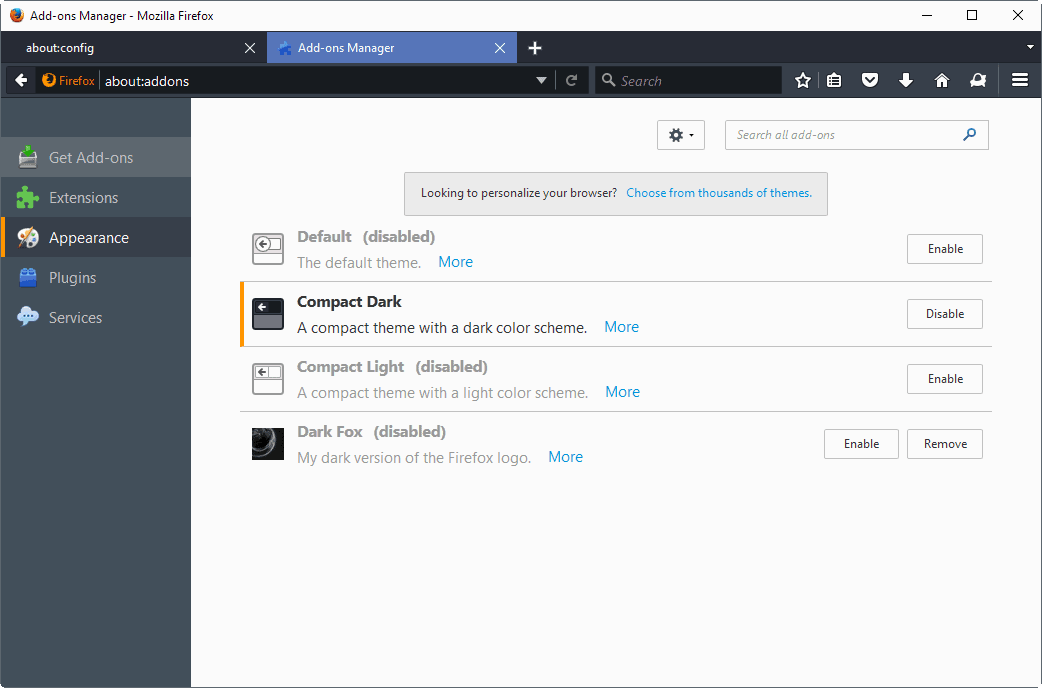
Compact Dark and Compact Light themes

Click "Extension" > "Appearance"

compact themes firefox


OFFICIAL DOWNLOAD LINK


IndonesianBahasa IndonesiaDownload for Windows Download for MacDownload for Linux

English (US)English (US)Download for Windows Download for MacDownload for Linux


Firefox for Windows 64 bit
after click the link, wait 5 seconds, then click on "SKIP AD" in the upper right corner
(setelah di klik Tunggu 5 detik, lalu klik tulisan "SKIP AD" di pojok kanan atas)


AFTER INSTALL FIREFOX, ALSO Download  

SpeedyFox (Database Optimizer)  
http://www.crystalidea.com/download/speedyfox.exe 


also DOWNLOAD & INSTALL

Adblock Plus


 http://www.apkreleases.com/wp-content/uploads/2014/09/ff.png

Download Gratis SmadAV 2017 Rev.11.6.5

FREE DOWNLOAD / GRATIS ANTIVIRUS SMADAV Rev. 11.6.5 2017

Perubahan tampilan dan bahasa Smadav 2017, Penambahan database virus baru, Penyempurnaan metode pengebalan USB flashdisk dsb.

Smadav 2017 Rev. 11.6.5 : 

+ Penambahan database 3064 virus,
+ Peningkatan kemampuan pendeteksian dan pembersihan virus yang sedang aktif di komputer,
+ Perbaikan gagal install pada Windows XP/Vista dan crash DEP pada Windows Server,
+ Penambahan fitur otomatis karantina dan tanggal karantina
+ Perubahan ketentuan fitur Smadav Free dan Pro.


(setelah di klik diatas, Tunggu 5 detik, lalu klik tulisan "SKIP AD" di pojok kanan atas)


GUNAKAN SMADAV SEBAGAI ANTIVIRUS KEDUA UNTUK MENCEGAH VIRUS YANG MENULAR DARI FLASHDISK/SSD/HARDISK EKSTERNAL.
KALIAN BISA MENGKOMBINASIKANNYA DENGAN AVIRA, AVAST, ATAU AVG

1) Proteksi tambahan untuk komputer Anda, 100% kompatibel dengan antivirus lainnya!

Sebagian besar antivirus tidak bisa di-install bersama antivirus lainnya, itu karena antivirus tersebut didesain untuk proteksi utama pada komputer Anda. Berbeda dengan Smadav, Smadav adalah tipe antivirus yang di-desain sebagai proteksi tambahan, sehingga 100% kompatibel dan dapat berjalan dengan baik walaupun sudah ada antivirus lain di komputer Anda, dalam hal ini Smadav berfungsi sebagai lapisan pertahanan kedua. Smadav mempunyai caranya sendiri (behavior, heuristic, dan whitelisting) dalam mendeteksi dan membersihkan virus sehingga akan lebih meningkatkan keamanan di komputer tersebut. Karena penggunaan resource Smadav yang sangat kecil, Smadav tidak akan menambah berat kinerja komputer Anda dalam penggunaannya. Jadi, dengan perpaduan proteksi antara Smadav dan antivirus yang sudah ter-install di komputer Anda akan semakin memperkuat pertahanan komputer Anda dari infeksi virus.

2) Best USB Antivirus (Proteksi Total USB Flashdisk)

USB Flashdisk adalah salah satu media penyebaran virus terbesar di Indonesia. Smadav mempunyai teknologi khusus untuk pencegahan total virus yang menyebar via USB Flashdisk. Misi Smadav adalah 100% tidak ada lagi infeksi virus dari flashdisk. Smadav mempunyai cukup banyak signature virus yang menginfeksi flashdisk, dan mempunyai kemampuan khusus untuk mendeteksi virus baru di flashdisk walaupun belum ada di database Smadav. Tidak hanya pencegahan, Smadav juga mampu membersihkan virus yang menginfeksi dan mengembalikan file yang disembunyikan virus di USB Flashdisk tersebut

3) Best for offline use (tidak perlu update terlalu sering)

Smadav sangat baik digunakan untuk komputer yang jarang atau bahkan tidak terkoneksi ke internet. Smadav tidak perlu melakukan update sesering antivirus lainnya yang biasanya melakukan update per minggu bahkan per hari. Smadav biasanya melakukan update hanya sebulan sekali (monthly). Smadav tidak terlalu tergantung pada signature/database virusnya, tapi lebih bergantung kepada teknik deteksi behavior, heuristic, dan whitelisting.

4) Cleaner dan tools untuk membersihkan virus

Smadav juga mampu membersihkan virus yang sudah menginfeksi komputer dan memperbaiki registry yang diubah oleh virus tersebut. Antivirus lainnya biasanya tidak melakukan pembersihan registry sehingga komputer belum kembali normal setelah dibersihkan antivirus tersebut. Banyak tools pendukung yang disertakan di Smadav sebagai senjata untuk melakukan pembersihan virus. Catatan : Tidak semua tipe virus bisa dibersihkan Smadav, Smadav saat ini masih belum mampu membersihkan tipe virus penginfeksi program atau tipe rootkit (misalnya : virus Ramnit, Sality, Alman, Virut, dll.) karena jenis virus ini sudah merusak sebagian besar file program Anda. Fokus kami saat ini adalah pembersihan tuntas untuk tipe virus selain dua tipe tersebut (misalnya : virus WormShortcut, Serviks, MSO, Brontok, dll.)

Apa kelebihan Smadav Pro dibandingkan Smadav Free?

Smadav Pro mempunyai banyak fitur tambahan yang tidak ada di Smadav Free, berikut ini adalah fitur-fitur tambahan yang akan Anda dapatkan pada Smadav Pro : Update Otomatis Online, Scanning 10x Lebih Cepat, Exception List, Maximize/Resize, Mengganti Warna Tema, Password Admin, dan Izin Penggunaan Profit. Anda harus menjadi donatur untuk mendapatkan Smadav Pro. Catatan : Smadav Free & Pro mempunyai kemampuan deteksi yang sama. Bedanya hanya pada fitur auto-update dan fitur tambahan lainnya.
[Klik disini] Untuk melihat penjelasan cara mendapatkan Smadav Pro >>

Bagaimana Cara Update Smadav?

Untuk pengguna Smadav Free, Anda harus men-download ulang file Smadav 2013 Revisi terbarukemudian membuka program Smadav tersebut di komputer Anda dan tidak perlu koneksi internet lagi, nanti akan ada konfirmasi bahwa Smadav akan di-update. Smadav versi Free tidak mempunyai fitur update otomatis, untuk mendapatkan update otomatis lewat internet Anda harus menggunakan Smadav versi Pro. Jika menggunakan Smadav Pro, Anda tidak perlu lagi memikirkan update Smadav karena Smadav yang ada di komputer Anda akan otomatis terupdate jika terkoneksi ke internet. Smadav akan terus direvisi dalam periode biasanya sebulan sekali. Anda dapat memperoleh berita & update langsung ke Facebook Anda dengan mendaftar terlebih dahulu dihalaman facebook Smadav, klik disini untuk langsung mendaftar.

MEMBELI LISENSI, BERARTI KALIAN MENGHARGAI KARYA ASLI ANAK INDONESIA,
DAN AGAR SMADAV TERUS BISA BERKEMBANG dan MERILIS VERSI TERBARUNYA..
MERKA JUGA BUTUH BUAT BELI KOPI SOB...

Izin Penggunaan Profit

Smadav versi Free hanya diizinkan untuk penggunaan non-profit seperti komputer/laptop pribadi di rumah atau organisasi non-profit. 
Sedangkan Smadav versi Pro digunakan untuk member Smadav atau lembaga/organisasi profit (komputer/laptop perusahaan, warnet, toko, rental komputer, service komputer, studio, dll.)

Daftar Harga Smadav Pro :
Jumlah KeyHarga
1 key untuk 1 komputerRp 30.000
3 key untuk 3 komputerRp 50.000
6 key untuk 6 komputerRp 100.000

Jika ingin membeli lisensi resmi SmadAV PRO secara online

Bilang aja dapet info dari Blog AGUNKz scrEaMO :-B

https://blogger.googleusercontent.com/img/b/R29vZ2xl/AVvXsEhp405iAueG1iHKW5fzwHykXAoTJeW5BHSoULIBKiskPohAQP_0SbeU1KRGxxHx7co3zLI5lnRz74AEGCGtjVUJ4_e2z8AV1XehedGj7PeQ51tApziT5njVEyDHqMKXtzCzuttu-oNwKmwN/s1600/Smadav+Terbaru+2012+Antivirus+Lokal+Terbaik+Gratis.jpg

emoga bermanfaat...
Jangan lupa donasinya untuk blog ini agar bisa sharing ilmu bermanfaat lainnya Onion 91


ADS/DONASI BLOG :

BANK BNI/BNI Syariah (Kantor Cabang SYARIAH BANDUNG)
atas nama:
Nama : AGUNG Y D
No. Rekening : 0326970275

(semoga pahala kalian mengalir atas postingan/artikel bermanfaat di blog ini bagi yg membaca & mengamalkannya):

atau

Download Google Chrome 60 Offline Installer

Google Chrome 60 is a browser that combines a minimal design with sophisticated technology to make the web faster, safer, and easier. Google Chrome comes with a full range of competitive features, and is among the most standards-compliant and fastest browsers available. Chrome's minimalist interface, fast page-load times, and support for extensions make the browser appealing to the average user as well as to Google fanatics.


Google chrome 60 has garnered a lot of fame with many internet users since its launch in 2008. It has so far received a considerable share in global use among the internet browsers. The product upholds a Google sense of innovation, creativity and provides a simple to use, faster browsing for the user. The latest version comes with tabbed browsing, synchronization and privacy functions.  One can synchronize bookmarks, extensions, browser preference to ease access regardless of the computer in use. With the capability of tabbed browsing, one can duplicate tabs, drag and rearrange the tabs in the browser window. The tabs function singularly hence; in case one of them has a problem, the rest is unaffected. Embedding tabs is available in Google chrome hence a new tab originating from the parent will be next not at the end of the tabs list. Some of the factors that make the browser one of the best include security, compatibility, speed and ease of use.


Speed
  • Chrome is designed to be fast in every possible way: It's quick to start up from your desktop, loads web pages in a snap, and runs complex web applications fast .
Simplicity
  • Chrome's browser window is streamlined, clean and simple.Chrome also includes features that are designed for efficiency and ease of use. For example, you can search and navigate from the same box, and arrange tabs however you wish quickly and easily.
Security
  • Chrome is designed to keep you safer and more secure on the web with built-in malware and phishing protection, autoupdates to make sure the browser is up-to-date with the latest security updates, and more.
And more features
  • Chrome has many useful features built in, including extensions, translation in the browser, themes, and more.

• Sandboxing.  Every tab in Chrome is sandboxed, so that a tab can display contents of a web page and accept user input, but it will not be able to read the user’s desktop or personal files.
Google say they have “taken the existing process boundary and made it into a jail”. There is an exception to this rule; browser plugins such as Adobe Flash Player do not run within the boundaries of the tab jail, and so users will still be vulnerable to cross-browser exploits based on plugins, until plugins have been updated to work with the new Chrome security. Google has also developed a new phishing blacklist, which will be built into Chrome, as well as made available via a separate public API.

• Privacy. Google announces a so-called incognito mode claiming that it “lets you browse the web in complete privacy because it doesn’t record any of your activity”. No features of this, and no implications of the default mode with respect to Google’s database are given.
• Speed. Speed improvements are a primary design goal.

Stability
• Multiprocessing. The Gears team were considering a multithreaded browser (noting that a problem with existing web browser implementations was that they are inherently single-threaded) and Chrome implemented this concept with a multiprocessing architecture. A separate process is allocated to each task (eg tabs, plugins), as is the case with modern operating systems. This prevents tasks from interfering with each other which is good for both security and stability; an attacker successfully gaining access to one application does not give them access to all and failure in one application results in a “Sad Tab” screen of death. This strategy exacts a fixed per-process cost up front but results in less memory bloat overall as fragmentation is confined to each process and no longer results in further memory allocations. To complement this, Chrome will also feature a process manager which will allow the user to see how much memory and CPU each tab is using, as well as kill unresponsive tabs.

User interface
• Features. Chrome has added some commonly used plugin-specific features of other browsers into the default package, such as an Incognito tab mode, where no logs of the user activity are stored, and all cookies from the session are discarded. As a part of Chrome’s javascript virtual machine, pop-up javascript windows will not be shown by default, and will instead appear as a small bar at the bottom of the interface until the user wishes to display or hide the window. Chrome will include support for web applications running  alongside other local applications on the computer. Tabs can be put in a web-app mode, where the omnibar and controls will be hidden with the goal of allowing the user to use the web-app without the browser “in the  way”.

• Rendering Engine. Chrome uses the WebKit rendering engine on advice from the Gears team because it is simple, memory efficient, useful on embedded devices and easy to learn for new developers.

• Tabs. While all of the major tabbed web browsers (e.g. Internet Explorer, Firefox) have been designed with the window as the primary container, Chrome will put tabs first (similar to Opera). The most immediate way this will show is in the user interface: tabs will be at the top of the window, instead of below the controls, as in the other major tabbed browsers. In Chrome, each tab will be an individual process, and each will have its own browser controls and address bar (dubbed omnibox), a design that adds stability to the browser. If one tab fails only one process dies; the browser can still be used as normal with the exception of the dead tab. Chrome will also implement a New Tab Page which shows the nine most visited pages in thumbnails, along with the most searched on sites, most recently bookmarked sites, and most recently closed tabs, upon opening a new tab, similar to Opera’s “Speed Dial” page.


What's New On Google Chrome 60  FINAL ?
The Chrome team is delighted to announce the promotion of Chrome 60 to the stable channel for Windows, Mac and Linux. This will roll out over the coming days/weeks.

Chrome 60.0.3112.78 contains a number of fixes and improvements -- a list of changes is available in the log. Watch out for upcoming Chrome and Chromium blog posts about new features and big efforts delivered in 60.

Security Fixes and Rewards
Note: Access to bug details and links may be kept restricted until a majority of users are updated with a fix. We will also retain restrictions if the bug exists in a third party library that other projects similarly depend on, but haven’t yet fixed.

This update includes 40 security fixes. Below, we highlight fixes that were contributed by external researchers. Please see the Chrome Security Page for more information.

[$10000][728887] High CVE-2017-5091: Use after free in IndexedDB. Reported by Ned Williamson on 2017-06-02
[$5000][733549] High CVE-2017-5092: Use after free in PPAPI. Reported by Yu Zhou, Yuan Deng of Ant-financial Light-Year Security Lab (蚂蚁金服巴斯光年安全实验室) on 2017-06-15
[$3000][550017] High CVE-2017-5093: UI spoofing in Blink. Reported by Luan Herrera on 2015-10-31
[$1000][702946] High CVE-2017-5094: Type confusion in extensions. Reported by Anonymous on 2017-03-19
[$1000][732661] High CVE-2017-5095: Out-of-bounds write in PDFium. Reported by Anonymous on 2017-06-13
[$TBD][714442] High CVE-2017-5096: User information leak via Android intents. Reported by Takeshi Terada on 2017-04-23
[$TBD][740789] High CVE-2017-5097: Out-of-bounds read in Skia. Reported by Anonymous on 2017-07-11
[$TBD][740803] High CVE-2017-5098: Use after free in V8. Reported by Jihoon Kim on 2017-07-11
[$N/A][733548] High CVE-2017-5099: Out-of-bounds write in PPAPI. Reported by Yuan Deng, Yu Zhou of Ant-financial Light-Year Security Lab (蚂蚁金服巴斯光年安全实验室) on 2017-06-15
[$2000][718292] Medium CVE-2017-5100: Use after free in Chrome Apps. Reported by Anonymous on 2017-05-04
[$1000][681740] Medium CVE-2017-5101: URL spoofing in OmniBox. Reported by Luan Herrera on 2017-01-17
[$1000][727678] Medium CVE-2017-5102: Uninitialized use in Skia. Reported by Anonymous on 2017-05-30
[$500][726199] Medium CVE-2017-5103: Uninitialized use in Skia. Reported by Anonymous on 2017-05-25
[$500][729105] Medium CVE-2017-5104: UI spoofing in browser. Reported by Khalil Zhani on 2017-06-02
[$N/A][742407] Medium CVE-2017-7000: Pointer disclosure in SQLite. Reported by Chaitin Security Research Lab (@ChaitinTech) working with Trend Micro's Zero Day Initiative
[$1000][729979] Low CVE-2017-5105: URL spoofing in OmniBox. Reported by Rayyan Bijoora on 2017-06-06
[$TBD][714628] Medium CVE-2017-5106: URL spoofing in OmniBox. Reported by Jack Zac on 2017-04-24
[$N/A][686253] Low CVE-2017-5107: User information leak via SVG. Reported by David Kohlbrenner of UC San Diego on 2017-01-27
[$N/A][695830] Low CVE-2017-5108: Type confusion in PDFium. Reported by Guang Gong of Alpha Team, Qihoo 360 on 2017-02-24
[$N/A][710400] Low CVE-2017-5109: UI spoofing in browser. Reported by José María Acuña Morgado on 2017-04-11
[$N/A][717476] Low CVE-2017-5110: UI spoofing in payments dialog. Reported by xisigr of Tencent's Xuanwu Lab on 2017-05-02

We would also like to thank all security researchers that worked with us during the development cycle to prevent security bugs from ever reaching the stable channel.

As usual, our ongoing internal security work was responsible for a wide range of fixes:
  • [748565] Various fixes from internal audits, fuzzing and other initiatives


Interested in switching release channels? Find out how.  If you find a new issue, please let us know by filing a bug.  The community help forum is also a great place to reach out for help or learn about common issues.


Richard Bustamante
Google Chrome


after click the link above/below, wait 5 seconds, then click on "SKIP AD" in the upper right corner
(setelah di klik Tunggu 5 detik, lalu klik tulisan "SKIP AD" di pojok kanan atas)